There is no escaping the relentless march of AI. Software companies are rapidly incorporating it into many business tools. This includes tools like Microsoft 365, Salesforce, and others.
Many people are still concerned about where AI will go. But there is no denying that it makes certain work more efficient. It can generate custom images on demand. Or write a company device policy draft in seconds.
Staying ahead of the curve often means embracing cutting-edge technologies. Even if you’re a little wary about what the future holds.
Generative Artificial Intelligence (GenAI) is unique from the AI of a few years back. It can create, innovate, and optimize. These functions have become a game-changer for businesses of all sizes.
Leveraging Generative AI, small businesses can unlock a world of possibilities. This includes everything from enhancing customer experiences to streamlining operations.
Have you felt bombarded with AI tool options? Unsure where to begin with leveraging it for your business? Let’s explore some smart and practical ways to incorporate GenAI.
1. Personalized Customer Experiences
Generative AI algorithms can analyze customer data and preferences. Using these, it can create personalized experiences.
48% of customers expect specialized treatment for being loyal to a company.
Some of the ways AI can help you improve customer experience include:
Tailored product recommendations
Customized marketing messages
Custom coupons
Proactive engagement
These things help small businesses enhance customer satisfaction, fostering brand loyalty.
2. Presentations & Graphics Creation
Generating a great sales presentation can be time-consuming. AI tools can automate this process. Microsoft Copilot is one of these. It can take meeting notes and prompts and create a presentation. Including images!
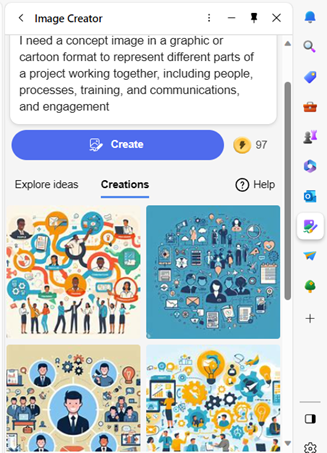
Have you ever had trouble finding a promotional image? Tell Bing’s new AI tool what you need. You’ll get several options, tailored to your description.
Example from Bing powered by DALL-E3 in Edge
AI-driven platforms can produce relevant and engaging graphics. This frees up valuable time and saves money for business owners.
3. Chatbots for Customer Support
AI-powered chatbots on websites and social media platforms are becoming commonplace. This is because they enable small businesses to provide instant customer support. Which is exactly what people expect these days.
These chatbots can handle frequently asked questions. They can also assist with product inquiries and customer transactions.
They help small companies provide round-the-clock help for customers. But without having to pay for extra staff hours.
4. Data Analysis and Insights
Generative AI can process vast datasets to extract meaningful insights. Small businesses can use AI algorithms to analyze important data.
Such as:
Market trends
Customer behavior
Operational data
These insights can inform strategic decision-making. Which helps businesses refine their offerings and marketing strategies.
5. Product Design and Prototyping
AI in product design process allows businesses to explore many design variations rapidly. AI algorithms can generate prototypes and simulations. They do this based on specified parameters. This enables small businesses to visualize products before investing in physical prototypes.
6. Supply Chain Optimization
AI can optimize supply chain operations. It can predict demand, identify inefficiencies, and suggest inventory levels. It takes away the human error component. As well as fees up teams from tedious administrative work.
Small businesses can reduce costs and improve efficiency. AI automates a lot of the supply process. This helps ensure products are readily available when customers need them.
7. Dynamic Pricing Strategies
AI-driven pricing algorithms can help companies make better pricing decisions. Pricing your products and services can be tricky. You don’t want to go too low or too high.
AI helps businesses quickly analyze:
Market trends
Competitor pricing
Customer behavior
These data insights help companies optimize pricing strategies. Small businesses can also dynamically adjust prices based on demand. This maximizes profits while remaining competitive in the market.
8. Human Resources and Recruitment
Generative AI can streamline the recruitment process. The hiring process includes a lot of work reviewing resumes. Many candidates don’t make the interview stage.
AI can help by analyzing resumes and screening candidates for you. It can even help with conducting initial interviews. Small businesses can find the best talent to drive their growth faster.
9. Predictive Maintenance
Downtime on a production line is costly. Proactive maintenance is vital. It’s another area where Generative AI can help.
The technology can predict maintenance needs based on data analysis. It helps businesses avoid costly downtimes. It proactively addresses maintenance requirements. As well as helps to ensure smooth operations.
Unsure How to Get Started with AI at Your Business?
Generative AI opens a world of opportunities for small businesses. It can also add to the complexity of a technology infrastructure.
We can help you use it effectively and affordably. Give us a call today to schedule a chat.
In a world where technology constantly evolves, Microsoft stands at the forefront. It continues to pioneer innovations. Innovations that transform how we interact with our digital universe.
The fall Windows 11 update is a testament to Microsoft's commitment to excellence. It’s more than just an upgrade. It's a leap into the future of computing. Microsoft touts it as “The most personal Windows 11 experience.”
Let’s explore some of the great features that make this update so significant.
Microsoft Copilot: Your Intelligent Partner in Creativity
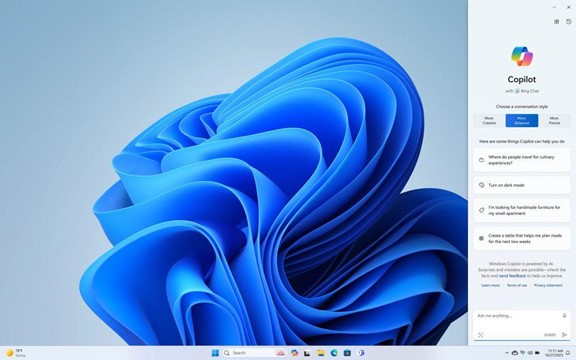
A standout feature of the fall Windows 11 update is Microsoft Copilot. This AI-driven marvel is like your personal PC assistant.
Need help summarizing a web page? Want to change to dark mode, but forgot how? Looking for a quick custom image for a social media post? Microsoft Copilot can do all that and more.
Copilot is seamlessly integrated into Windows 11. It offers real-time suggestions and turns ideas into reality with remarkable ease. Ask it what you need, and the AI engine gets to work.
Have you ever wished that Windows’ Snipping Tool could do more? This update grants that wish. The Snipping Tool is just one of many to get an AI upgrade.
Look for new capabilities in Paint, Clipchamp, and Photos. Get a unique image from inputting a text prompt and style. The Cocreator tool in Paint makes it easy to jumpstart your creativity. It will generate the image, then you can edit it in the same app.
Microsoft Clipchamp is one of the easiest video creator tools out there. You can now just drag in your assets and clips. Then, click to have the AI engine work its magic to create a video for you.
The new Clipchamp Auto Compose feature can:
Recommend scenes
Make edits
Create a narrative based on your inputs
Easy Data Migration with Windows Backup
When you buy a new computer, moving data can be a pain. It can take hours to move your “pc life” between devices. And there’s always the risk you’ll miss something.
The new Windows Backup feature makes moving between computers easier. You can choose backup options and folders. When ready to move, it’s a simple process. You can restore the new PC from another backed-up PC.
Microsoft Edge: A Faster and More Secure Browsing Experience
Microsoft Edge received significant enhancements. These focus on speed, responsiveness, and security. The Edge Secure Network feature offers more gigabytes. Microsoft increased user storage from 1GB to 5GB. This function encrypts your internet connection to secure data.
Edge Secure Network has many features of a VPN. This is great for extra online security. It’s also helpful for companies trying to prevent breaches from clicks on phishing links.
Save Energy & Battery Power
A feature called Adaptive Dimming is another enhancement of this update. Your screen slowly dims if you’re no longer paying attention. This has the dual benefit of saving energy and helping you refocus.
PC sensors power this feature as well as two others. So, it’s going to be more common with newer computers.
The other two features that use sensors are:
Wake on Approach
Lock on Leave
A More Personal Windows 11 Experience
Beyond the technical innovations, this update brings more. Including a more personal touch to the user experience. Tailored to individual preferences, Windows 11 becomes an extension of the user's identity.
This includes things like:
Personalized themes
Custom widgets
Intelligent assistants
Every interaction feels curated and intuitive. It makes for a truly personalized operating system.
Other Cool Enhancements
There’s a lot of excitement packed into Windows 11. Here are a few more new features you can explore.
Copilot in Microsoft Shopping: Find what you need fast when shopping online. Bing will provide tailored recommendations based on your requests.
Content Credentials: Add an invisible digital watermark to your AI-generated images in Bing. Cryptographic methods help you tag your work.
Bing Chat Enterprise Updates: Boost work creativity and enjoy multimodal visual search. Find information using only images.
DALL.E 3 Model from Open AI: Use the Image Creator in Bing and you’ll likely be impressed. It’s had an upgrade and uses the DALL.E 3 model to render images from text prompts.
Harness the Power of Microsoft Products
Microsoft is definitely a leader in work productivity tools. And it has been for a long time. If you’re still working like it was 2020, let us help you upgrade. Employees can be more efficient than ever with the right apps.
We’ve got your back with Microsoft 365, Windows 11, and other solutions. Our experts will guide you, so you can gain an edge on the competition.
Introduction:In my recent interactions with various small businesses in the RGV, I've observed a concerning oversight that many business owners seem to share—an absence of a critical cybersecurity component: a firewall. While some businesses leverage cloud-based applications, there's a common misconception that this negates the need for additional protection. However, the reality is that relying solely on the cloud without adequate network security measures can leave a business vulnerable to severe risks.
Cloud Applications Don't Equate to Comprehensive Protection:
It's a common misconception among small business owners that utilizing cloud-based applications ensures comprehensive protection against cyber threats. While these applications offer their own security measures, they don't provide immunity to other potential risks, such as malware attacks. For instance, a business operating without a firewall remains susceptible to malware that can encrypt all computers within the network, making the computers unusable, causing significant disruptions and potential data loss.
The Risk of Malware Encryption:
Malware, such as ransomware, can be particularly devastating to a business's operations. Even if your business applications are hosted in the cloud, a malware attack that encrypts all computers within your network can bring your operations to a standstill. Without a firewall acting as a barrier against these threats, the repercussions of a malware attack can be crippling, leading to extensive downtime and potential loss of critical data.
The Crucial Role of a Firewall:
A firewall serves as a crucial defense mechanism, protecting your network from unauthorized access and filtering potentially harmful traffic, including malware. Its importance extends beyond traditional on-premises networks—it's a critical component in safeguarding cloud-connected systems, preventing malware from spreading across your network and affecting your business's operations.
Taking Proactive Measures:
As a small business owner, it's essential to recognize that the cloud does not guarantee complete protection against cyber threats. Implementing a firewall as part of your cybersecurity strategy is imperative for fortifying your defenses and mitigating potential risks, even if your business applications are hosted in the cloud. Consulting with cybersecurity experts to assess your network's vulnerabilities and deploying robust security measures, including a firewall, is crucial for safeguarding your business's continuity.
Conclusion:
In the evolving landscape of cybersecurity threats, overlooking the necessity of a firewall can expose your business to substantial risks, regardless of utilizing cloud-based applications. Don't underestimate the potential impact of malware attacks and the importance of a firewall in protecting your business's operations and sensitive data. Take proactive steps to strengthen your network security and fortify your business against the ever-present threat of cyber attacks.
Remember, safeguarding your business's future involves not just leveraging the cloud but also ensuring comprehensive cybersecurity measures, including the implementation of a firewall.
Cybersecurity has become a critical foundation upon which many aspects of business rely. Whether you’re a large enterprise or small business, network security is a must. Cyberattacks can have long-term consequences.
The frequency and sophistication of cyberattacks continue to increase. In 2022, IoT malware attacks saw a sobering 87% increase. Attack volume is also ramping up due to the use of AI.
It’s essential to shift from a reactive to a proactive cybersecurity approach. One such approach that has gained prominence is "Secure by Design" practices.
International partners have taken steps to address commonly exploited vulnerabilities. A recent advisory highlights Secure by Design principles. This collaborative effort underscores the global nature of the cybersecurity threat landscape. As well as the need for coordinated action to protect critical infrastructure.
In this article, we'll explore what it takes to put in place Secure by Design principles. And explain why they are paramount in today's cybersecurity landscape.
Today’s Modern Cyberthreats
Cybersecurity threats have evolved significantly over the years. Gone are the days when just installing an antivirus could protect your computer. Today, cybercriminals use highly sophisticated tactics. The potential impact of an attack goes far beyond the inconvenience of a virus.
Modern cyber threats encompass a wide range of attacks, including:
Ransomware: Malware that encrypts your data and demands a ransom for decryption. One of the costliest attacks for businesses.
Phishing: Deceptive emails or messages that trick you into revealing sensitive information. Eighty-three percent of companies experience a phishing attack each year.
Zero-Day Exploits: Attacks that target vulnerabilities not yet known to software developers.
IoT Vulnerabilities: Hackers exploit vulnerabilities in Internet of Things (IoT) devices to compromise networks.
These evolving threats underscore the need for a proactive approach to cybersecurity. Instead of reacting to attacks after they occur, you want to prevent them from happening.
What Is Secure by Design?
Secure by Design is a modern cybersecurity approach. It integrates security measures into the very foundation of a system, app, or device. It does this from the start.
It's about considering security as a fundamental aspect of the development process. Rather than including it as a feature later.
How can businesses of all types translate this into their cybersecurity strategies? There are two key ways:
When purchasing hardware or software, ask about Secure by Design. Does the supplier use these practices? If not, you may want to consider a different vendor.
Incorporate Secure by Design principles into your own business. Such as when planning an infrastructure upgrade or customer service enhancement. Put cybersecurity at the center. Instead of adding it as an afterthought.
Key principles of Secure by Design include:
Risk Assessment: Identifying potential security risks and vulnerabilities early in the design phase.
Standard Framework: Maintain consistency when applying security standards by following a framework. Such as CIS Critical Security Controls, HIPAA, or GDPR.
Least Privilege: Limiting access to resources to only those who need it for their roles.
Defense in Depth: Implementing many layers of security to protect against various threats.
Regular Updates: Ensuring that security measures are continuously updated to address new threats.
User Education: Educating users about security best practices and potential risks.
Why Secure-by-Design Matters
Understanding and implementing Secure by Design practices is crucial for several reasons:
Proactive Security
Traditional cybersecurity approaches are often reactive. This means they address security issues after they've occurred. Secure by Design builds security measures into the very foundation of a system. This minimizes vulnerabilities from the start.
Cost Savings
Addressing security issues after a system is in production can be costly. The same is true for trying to address them near the end of a project. By integrating security from the beginning, you can avoid these extra expenses.
Regulatory Compliance
Many industries are subject to strict regulatory requirements for data protection and cybersecurity. Secure by Design practices can help you meet these compliance standards more effectively. It reduces the risk of unknowns that end up costing you in fines and penalties.
Reputation Management
A security breach can severely damage your organization's reputation. Implementing Secure by Design practices demonstrates your commitment to protecting user data. It can also enhance trust among customers and stakeholders.
Future-Proofing
Cyber threats continue to evolve. Secure by Design practices help ensure that your systems and applications remain resilient. Especially against emerging threats.
Minimizing Attack Surfaces
Secure by Design focuses on reducing the attack surface of your systems. Using it helps in identifying and mitigating potential vulnerabilities. You mitigate threats before a hacker exploits them.
Need to Modernize Your Cybersecurity Strategy?
A cybersecurity strategy put in place five years ago can easily be outdated today. Need some help modernizing your company’s cybersecurity?
Imagine you’re working away on your PC and see a Windows update prompt. Instead of ignoring it, you take action. After all, you want to keep your device safe. But when you install what you think is a legitimate update, you’re infected with ransomware.
That’s the nightmare caused by an emerging cybersecurity threat.
Cybercriminals are constantly devising new ways to infiltrate systems. They encrypt valuable data, leaving victims with difficult choices. Once ransomware infects your system, your PC is pretty useless. You either have to pay a ransom or get someone to remove the malware. As well as install a backup (if you have one!).
One such variant that has emerged recently is the "Big Head" ransomware. It adds a new layer of deception by disguising itself as a Windows update. In this article, we'll explore the ins and outs of Big Head ransomware. Including its deceptive tactics. We well as how you can protect yourself from falling victim to such attacks.
The Big Head Ransomware Deception
Ransomware attacks have long been infamous for their ability to encrypt files. This renders them inaccessible to the victim until a ransom is paid to the attacker. In the case of Big Head ransomware, the attackers have taken their tactics to the next level. The attack masquerades as a Windows update.
Big Head ransomware presents victims with a convincing and fake Windows update alert. Attackers design this fake alert to trick users. They think that their computer is undergoing a legitimate Windows update. The message may appear in a pop-up window or as a notification.
The deception goes even further. The ransomware uses a forged Microsoft digital signature. This makes the fake update appear more authentic. This adds an extra layer of credibility to the malicious message. And makes it even more challenging for users to discern its true nature.
The attack fools the victim into thinking it’s a legitimate Windows update. They then unknowingly download and execute the ransomware onto their system. From there, the ransomware proceeds to encrypt the victim's files. Victims see a message demanding a ransom payment in exchange for the decryption key.
By 2031, it’s expected a ransomware attack will occur every 2 seconds.
Protect Yourself from Big Head Ransomware & Similar Threats
Cyber threats are becoming more sophisticated. It’s not just the good guys exploring the uses of ChatGPT. It's crucial to take proactive steps to protect your data and systems. Here are some strategies to safeguard yourself from ransomware attacks like Big Head.
Keep Software and Systems Updated
This one is tricky. Because updating your computer is a best practice for security. Yet, Big Head ransomware leverages the appearance of Windows updates.
One way to be sure you’re installing a real update is to automate. Automate your Windows updates through your device or an IT provider (like us). This increases the chances of spotting a fake that pops up unexpectedly.
Verify the Authenticity of Update
Before installing any software update, verify its authenticity. Genuine Windows updates will come directly from Microsoft's official website. Or through your IT service provider or Windows Update settings. Be cautious of unsolicited update notifications. Especially those received via email or from unfamiliar sources.
Backup Your Data
Regularly back up your important files. Use an external storage device or a secure cloud backup service. In the event of a ransomware attack, having backup copies is vital. Backups of your data can allow you to restore your files without paying a ransom.
Use Robust Security Software
Install reputable antivirus and anti-malware software on your computer. These programs can help detect and block ransomware threats. This helps prevent them from infiltrating your system.
Educate Yourself and Others
Stay informed about the latest ransomware threats and tactics. Educate yourself and your colleagues or family members. Discuss the dangers of clicking on suspicious links. As well as downloading attachments from unknown sources.
Use Email Security Measures
Ransomware often spreads through phishing emails. Put in place robust email security measures. Be cautious about opening email attachments or clicking on links. Watch out for emails from unknown senders.
Enable Firewall and Network Security
Activate your computer's firewall. Use network security solutions to prevent unauthorized access to your network and devices.
Disable Auto-Run Features
Configure your computer to disable auto-run functionality for external drives. This can help prevent ransomware from spreading through infected USB drives.
Be Wary of Pop-Up Alerts
Exercise caution when encountering pop-up alerts. Especially those that ask you to download or install software. Verify the legitimacy of such alerts before taking any action.
Keep an Eye on Your System
Keep an eye on your computer's performance and any unusual activity. If you notice anything suspicious, investigate immediately. Suspicious PC activity can be:
Unexpected system slowdowns
File changes
Missing files or folders
Your PC’s processor “whirring” when you’re not doing anything
Have a Response Plan
In the unfortunate event of a ransomware attack, have a response plan in place. Know how to disconnect from the network. Report the incident to your IT department or a cybersecurity professional. Avoid paying the ransom if possible.
Need a Cybersecurity Audit?
Don’t leave unknown threats lurking in your system. A cybersecurity audit can shed light on your system vulnerabilities. It's an important proactive measure to ensure network security.