
Biometrics: What the Future Holds for Identity Verification

Biometrics: What the Future Holds for Identity Verification

biometrics identity verification

Back in the mid-2000s, biometric authentication came into light as the future of digital security. We all thought that fingerprint records and facial recognition were totally new. Ask any officer at your local police station — the tech industry was beginning to discover the potential of integrating these biometric identity proofing measures. Here is what the future holds for identity verification.

Tech developers rejoiced as they found ways to bring biometrics into reality.

No longer were digital fingerprint scans and photo identification checks restricted to the world of sci-fi. Unfortunately, early biometric technologies came with apparent flaws that made users quick to deem them too good to be true.

Can we stop the methods of hackers with a biometric application?

Things have changed. To keep up with the ever-evolving methods of hackers, developers have made biometric applications more sophisticated than ever before. But how well does biometric identity proofing hold up to other security measures?

Do biometrics truly keep users safe from data breaches? Is there a possibility that biometric security could replace passwords, tickets, or even government-issued identification? Let’s take a closer look at what biometrics has to offer, and what it could have in store.

Biometrics of the Past

When biometric security systems started gaining relevance in the tech market, companies all over the globe began to show interest. Businesses, both large and small, depended mainly on passwords to secure their private networks, as many still do today.

However, a weak or compromised password is all it takes to jeopardize a private digital database. Manufacturers swore by their fingerprint scanners and facial recognition software, claiming that their products were significantly better security measures.

Unfortunately for biometric developers, naysayers were determined to find cracks in this digital armor — and they did. Fingerprint scanners were proven easily dupable. Fraudsters only needed a lifted fingerprint to fool scanners into giving access to the system they guarded.

Facial recognition tools weren’t exactly fail-safe, either. Biometric authentication developers often claimed that their systems had fail-safe measures like eye movement tracking in place to distinguish the difference between a real person and a photograph. In 2009, however, security researcher Duc Nguyen was able to use a picture to bypass login for Lenovo, Asus, and Toshiba computers.

Even in recent years, there have been considerable reports of these very same weaknesses in biometric technology.

Yes, there are weaknesses, though this isn’t to suggest that biometric authentication software hasn’t changed. It has, in several ways. Facial tracking has improved, and most authentication algorithms today can differentiate between a live human face and a photograph.

Identification technology used in today’s smartphones is more straightforward than that of most third-party security platforms.

However, it’s still significantly better than any of the applications available ten years ago. Unfortunately, hacking methods have evolved at the same pace, leaving many smartphone users to face the same risk.

X-Lab, a Chinese digital security team, showcased a technique for bypassing biometric security measures on smartphones in 2019. In only 20 minutes, X-Lab researchers were able to use a specially made app, cheap hardware, as well as photographs of the fingerprints left on the phone itself to unlock it successfully.

Deepfake technology has also been a cause for concern for companies that rely on biometric security.

Although these digital masks first proved themselves too primitive of severe implications, deepfakes have become increasingly convincing — enough to trick users and biometric authentication systems alike into believing that they’re genuine.

These recent findings beg the question; have there been any improvements in biometric authentication over the past decade?

The Newest in Biometric Technology

One can’t judge the validity of biometric authentication by basing its security off of smartphone applications alone. Today’s top identity authentication services understand the challenges that face biometrics today and are more equipped to tackle them.

The most notable improvements made in the field of biometrics lay in facial recognition software.

The notion may seem ironic, seeing as the X-Lab hacking demonstration only happened less than a year ago. But it is true — manufacturers are now integrating advanced learning algorithms into their facial recognition technology.

These algorithms ensure an authorized user’s presence by using 3D analytics to determine whether the user is actually present at the moment of authentication. These recognition algorithms can even read a user’s facial expressions and detect emotions.

Identity proofing providers now know that biometric identity verification must be multi-factored to be reliable.

In the past, manufacturers focused mainly on identifying users by their physical traits; fingerprints, facial recognition, and the like. With the right algorithm, these biological markers can still provide the security needed to ensure safe transactions. But as with all security systems, contingencies must be placed.

Today, identity proofing services use a combination of physical trait analyses, behavioral measurements (i.e., digital signatures and voice recognition), and issued ID checks to ensure that the user is who they say they are. Other commonly integrated methods include knowledge-based authentication, which may involve giving a password or answering a security question.

What about the sophisticated deepfake algorithms?

Multi-factored biometric authentications are pass or fail. A user must pass every verification factor. One slip will flag the security service of a possible hack attempt. Most advanced facial recognition software is typically able to spot whether a person is using a deepfake or not.

More advanced recognition technologies integrate consent verification, in which a user must show their face on camera and hold up an ID document or handwritten note, as per the system’s instructions. Should a sophisticated deepfake bypass the facial authentication process, the user would then need to provide enough additional information to bypass the other security factors.

If a hacker uses a deepfake to infiltrate their targeted network, blockchain is a significant line of defence. Companies like Eristica use blockchain to record every user transaction made on their mobile phone app. Eristica’s algorithm scans through the data on the chain to find any transactional discrepancies that signal fraudulent behavior.

The Future of Biometrics

Despite its rocky beginnings, biometric technology has become a highly favored security measure among today’s top companies and organizations. Users can now utilize several different biometric measures, including retinal scanning and voice recognition.

In addition to the already popular fingerprint and face recognition technologies. Increased demand for biometric security ensures that it isn’t going anywhere, any time soon. According to a recent forecast report by the Biometric System Market, biometrics is on track to grow into an industry worth $65.3 billion by 2024.

Profit outlook is positive, but the question on most tech professionals’ minds is whether the technology will continue to improve. Surely it will — it has to if biometric security providers keep up with the ever-evolving data-breaching methods companies face. But how?

Experts see endless possibilities for biometric technology. Soon, we could see biometrics replacing government-issued identification. Paper documents and ID cards are easily forgeable, after all. Anyone could gain access to a fake driver’s license, or even a phony passport. On the other hand, biometric technology only seems to become more secure as new developments arise.

One day soon, we might not need ID to apply for a loan, rent a car, access our bank accounts, or even fly a plane.

We’re a long way from biometric authentication for international travel. The world isn’t nearly globalized enough for that just yet. But a thumbprint and a facial scan might be all you need to board a domestic flight in the next few years. It may seem far fetched, but countries around the world are already experimenting with biometric facial recognition to provide their citizens with a more personalized security approach.

For example, Singapore is planning to replace passwords and a government-issued identification with biometrics for several different processes. Singaporeans will be able to use a facial recognition app, complete with anti-spoofing safeguards, to authenticate their identities.

With this technology, Singaporeans will be able to provide identification to rent hotel rooms, enter commercial buildings, and make sizeable monetary transactions, among other things.

Singapore may be among the first countries in the world to embrace biometric technology nationally, but they won’t soon be the last. People around the world have voiced a desire for their governments to implement biometric authentication. According to a 2017 study conducted by the International Air Transport Association (IATA), 82% of surveyed travelers stated that they would prefer to use a digital passport to travel.

The report also shows that travelers want a faster, more automated airport experience and are willing to use biometric identification to speed up their travel. In response to these critiques, over 63% of airlines included in the survey claim they are planning to invest in biometric technology before the end of 2020.

Biometrics have come a long way, and they still have farther to go — but they’ve more than proven their worth as an authentication measure that is as convenient as it is fast.

More popular applications currently lie within the realms of personal device security and online transactions. However, we could soon see our world leaders use biometrics to help us all stay a whole lot safer and lift globalization to new heights.

The post Biometrics: What the Future Holds for Identity Verification appeared first on ReadWrite.


Developing a Secure FinTech App – Best Practice for 2020

Developing a Secure FinTech App – Best Practice for 2020

develop secure fintech app

Over the years, we have seen a large increase in the usage of technology in finance and financial transactions. The introduction of financial applications has ensured that the ease of use and effectiveness, which has been on a constant rise over the decade, is made possible. Here is developing a secure FinTech app — the best practices for 2020.

End users can now make financial transactions through a snap of a finger through tech ease of access. But, we have to be wise in how we use the new FinTech apps.

With the ease of apps comes the danger of financial security, which is largely due to sensitive personal and business data shared on financial platforms. Care must be taken or it may result in major vulnerabilities such as data leakages and breaches.

Recent studies reveal that FinTech startups, about 98% are vulnerable to cyber attacks, risk of theft, and phishing. Considering that the finance industry is one that should be 100% secure in the protection of client data, it begs a question on aspects to consider while developing a FinTech app to make it more secure, while performing other functions as required.

We need to look into the possible ways of developing a finance app — keeping in mind that the security of data is paramount. Many companies forget security in their rush to get an app to market.

Integral parts of creating secure FinTech Applications.

With the focus on finding a solution to the vulnerabilities associated with developing a fintech app, this is some of the best practices on how to secure a financial app.

Establish infrastructural security.

It is without a doubt now that a responsible and trustworthy finance firm should consider establishing a secure infrastructure. Irrespective of either going for a private or public cloud storage system, it is imperative to make sure that cloud vendors of choice are security conscious and aligns with the modern data security standards.

Establish a secure application logic.

It’s simple, it is just making sure that while developing each stage of the app, security should be of conscious. In every step of the app usage, there should be a feeling of security to it. Questions like what types of data should be collected and safely secured, the passcode, and all other necessary info should be called to mind, not forgetting how best to monitor and secure the data collected.

Ensure to write secure code.

While it is important that your FinTech app is cross-platform responsive, it’s essential to also develop an algorithm that allows for easy detection of flaws in case of attacks or a breach. It is advisable to implement the inclusion of input validation and reviewing of data received in the app, while keeping a vivid eye on granting external access, defining clear access rules, and taking all adequate measures to secure appropriate data.

Run an App Test.

It’s never enough, take the time to test that app all over. Through all the processes and steps, perform effective penetration tests, adhere to the standard testing process for FinTech firms, and if necessary, hire professional testers to establish efficient attack resistant code.

Ensure API and Web-Server Security.

APIs, as well as web-servers, are usually run on mobile devices, and this makes it a target; hence the sensitivity in its security.

Encrypt Data.

Considering that all info received on the app is highly classified and important to your end-users, it’s very necessary that you consider encrypting all the data collected on your FinTech app. You can introduce various encryption algorithms like AES which is regarded as the safest.

Initiate a Payment Blocking Feature.

To remain secure, one of the best ways to hinder fraudulent activities on the app is to initiate a payment blocking feature in cases of suspicious activities. This will help to ensure the immediate block of suspicious payment, say a large amount of money transfer, or an unusual location transaction.

Conclusion

Developing a secure FinTech app is a lot of work. It wouldn’t be FinTech if it’s not secure after all. It’s imperative to make sure of testing the app through this procedure, and if necessary, hire professional hands to help with the process.

The post Developing a Secure FinTech App – Best Practice for 2020 appeared first on ReadWrite.

Why Real-Time Data Analysis is Crucial for Healthcare

Why Real-Time Data Analysis is Crucial for Healthcare

real-time data healthcare

Scientists believe Artificial Intelligence can free humanity from performing routine tasks in many areas. Healthcare is that area that seems to need these changes the most.

While outside it is already 2020, and the majority of businesses are digitalizing themselves. And moving from on-premises infrastructure to clouds. The healthcare industry remains a pain point for the biggest part of the world.

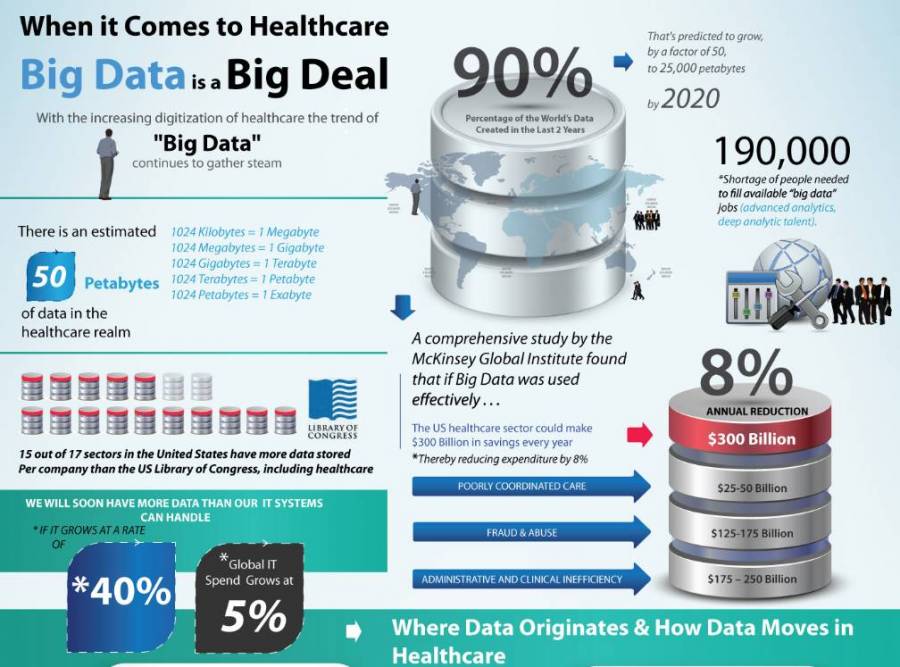
The research says that 56% of hospitals don’t have a strategy on how to govern data and conduct analytics. Healthcare still lacks the entire structured database, data from which can be easily read, interpreted, and applied to future treatment.

When we’re facing one of the most challenging pandemics of coronavirus, the new approaches to healthcare, data analysis, and predictive analytics are must-have tools to apply.

Data is our Life

Why is data our life? The doctors are the same humans as we, and the possibility of a mistake in prescribing or specifying the dose of medication is not uncommon today. One wrong prescription can become a threat, not only to the complete recovery. But to the life of a patient and all humanity, in general, the same rules apply. Mistakes across the healthcare field increase both insurance and hospital costs.

Data in healthcare is what we all are dependent on. Data analytics in healthcare, in its turn, is crucial for healthcare. As it is a decisive factor when defining the methods of treatment and prescribing medications. It can give us an entire picture of each patient’s condition, precision-driven methods of care.

Healthcare

Graphic source: bhmpc dot com

The real-time medical data analysis gives the possibility:

  • to keep and process data in real-time to be able to make a clinical decision at the right time.
  • to decrease costs on unnecessary medicaments, avoid duplications. It also allows searching for less costly alternatives
  • to minimize the risk of treatment of unaddressed and worsening conditions that need the clinician’s attention. So that problems may be addressed before the patient is readmitted.
  • to cut patient wait-times through measuring and scheduling the time of each procedure.
  • to ensure a more personalized patient’s treatment and increase the overall satisfaction.

Of course, hospitals can’t cut their costs or provide services to fewer patients. Instead, they can optimize their use of the assets and try to do more while spending less time and money resources on it. It might sound strange, but with Artificial Intelligence and its technologies of data analysis in health care and predictive analytics, it is more than possible.

How Do AI and Big Data Transform Healthcare?

The integration of Artificial Intelligence models in health care is one of the biggest focuses in the world in recent years. 2020 has just started, but already two leaders on the market announced their plans on budget allocation in AI in the healthcare industry:

  • Microsoft is going to invest $40 million in Artificial Intelligence technology for the healthcare sector for the next five years.
  • Bayer agreed on cooperation with Exscientia in drug manufacturing based on AI technologies.

That leaves us with no doubts that AI technologies are fundamentally changing the global health care system, making it possible to radically redesign the medical diagnosis system, develop new approaches to medical treatment. They are generally to improve the quality of healthcare services while reducing costs for medical clinics.

What does real-time data analysis in health care offered by AI enable:

  • Planning medical care for individuals and population groups, including prognostic management of disease progression.
  • Identification and involving the most effective practical measures to decrease the number of repeated hospitalizations.
  • Minimize the risk of blood poisoning and renal failure
  • Optimized management of treatment outcomes and drug costs.
  • Defining new methods of improving the quality of patient care.

Among the benefits of big data in healthcare is the possibility to improve the quality of clinical services, track financial performance. And detect fraud while freeing doctors from routine work and leave the opportunity to do what they have to do – help people to maintain their health in good condition And react to unforeseen health issues in time.

Words of Worth

While static data can just describe the health conditions of the patients and store necessary information about medicine. Data analysis can help answer more critical questions: ‘why is it happening so?’, ‘what can we do with it?’ and ‘how can we avoid this.’

The number of investments in Artificial Intelligence in healthcare, programs, researches. How the world adopts newly coming technologies to the industries, including healthcare. That means that the answers to the question will be found very soon.

Image Credit: cottonbro; pexels

The post Why Real-Time Data Analysis is Crucial for Healthcare appeared first on ReadWrite.

How to Keep Your Android Device  Secure Without Succumbing to Paranoia

How to Keep Your Android Device Secure Without Succumbing to Paranoia

device security

In this age of cyber breaches and sensitive data leaks, keeping your personal and commercial information safe has never been more important. What’s more, the security of our data is perhaps more vulnerable than ever as most of it is now stored on our mobile devices.

With that in mind, it’s easy to see the absolute necessity of keeping them as secure as possible. However, the ultimate security would require you to disable all the wireless modules of your device. Additionally, you’d have to set up a 20-character password with letters, numbers, and special characters.

There’s a reasonable balance between data security and convenience on your Android devices.

safe devices
How to Keep Your Android Device Secure

The goal of this overview is to find a reasonable balance between data security on an Android device and the convenience of everyday use. If you think that you’re a target for a spearfishing cyberattack, you’d probably be better off following the advice from the paragraph above; for the rest of us, the 10 suggestions below should be plenty to allow us to stay safe.

#1. Look at the brand and hardware

Several things we’re going to talk about below, including firmware issues and authentication methods, depend heavily on the implementation in a particular smartphone. For example, cheaper devices may not have special additional cameras and depth sensors for FaceID, which could make it possible to fool them by a photo or simple mask.

If device security is important to you, make sure that you understand the relevant specifications before purchasing. Another obvious recommendation is, of course, to avoid buying from lesser-known brands (think Leagoo, Doogee, or Homtom) or shady sellers — saving a couple of hundred dollars isn’t usually worth the risk.

#2. Check the firmware

Although normally you’d expect to receive proper original firmware when buying a new device, it’s not unheard of for the store to install software of its own on a smartphone before selling it. The store rarely does it with purely malicious intent. Sometimes it could be localized firmware for the target market, sometimes the seller wants to earn extra money with bloatware, and so on.

Anyway, having non-original firmware is a security threat. Not only do you not know what’s hidden there, but you also usually miss important security updates for your device. Therefore, it’s always a good idea to download original firmware from the manufacturer’s website and install it after obtaining a new device. It’s a sensible thing to do with a new smartphone and a must if you buy a used item.

#3. Choose your authentication methods

Any decent Android smartphone these days comes with a range of authentication methods built-in. In most cases, you’d be offered to choose from a password, PIN code, screen pattern, fingerprint, and FaceID.

Let’s assume you’ve read the first section of this overview carefully and got a phone where all authentication methods are implemented correctly. Which should you choose then?

From a security standpoint, a long, unique password is the best authentication method. The problem is, however, that entering it more than 100 times a day (yes, that’s how often we check our phones) isn’t convenient at all. PIN codes and patterns, however, can be guessed relatively easily. In addition to that, it’s quite easy to extract a pattern from a CCTV recording, even if its quality is very low.

With that in mind, fingerprint and/or FaceID are a good balance between security on your device and convenience. Keep in mind, however, that even some of the best implementations of those can be fooled by 3D-printed models or sleeping people. Also, make sure you set up a reasonably complex and unique password as the backup authentication method.

#4. Make sure you encrypt your device

An important step in securing data on your smartphone or tablet is encrypting it. The idea here is that the whole storage of the device gets encrypted every time the phone is locked. The encryption makes it next to impossible to recover the information without unlocking the device.

To turn on the encryption, set up your authentication methods first. Then go to Settings — Encryption and Credentials, and tap Encrypt phone. (The exact names of menu items may vary on different phones, but you get the idea.) The initial encryption process may take up to an hour. And afterward, you probably won’t be able to notice any change in the performance of the device.

#5. Do you need antivirus? It depends

For the experienced Windows users among us, having an antivirus installed on every device sounds like an obvious security measure. However, on mobile devices, it might not be as useful as it is on a PC.

First of all, there’s no way an antivirus suite can work on a mobile device in the same way as it does on a PC, always monitoring everything that’s going on in the system and periodically scanning the storage. This kind of operation would deplete the battery in a few hours.

As a result, a mobile antivirus would normally only scan the apps as they’re installed on the device. This functionality is superficial, however, if you only install applications from the Play Store. Google has a protection system of its own. This system makes sure both the app and the device are not infected by known malware.

In summary, it only makes sense to have a third-party antivirus if you, for any reason, often need to install applications from outside of trusted app stores. In that case, look for the software coming from companies with experience in fighting malware on desktop platforms that have built a reputation and trust over the years.

#6. Get a password manager

Just like on a desktop, a good mobile password manager is your friend. A human can’t possibly remember more than a few secure passwords, which leads either to password re-use on different services or the setting of insecure passwords, both of which put data security in serious jeopardy.

With a password manager installed, you’d only need to remember one master password that unlocks the storage. That way, all the passwords you use elsewhere can be different and secure. Most password managers on the market these days offer a mobile version. You can choose the one you like and keep it handy on your home screen.

#7. Set up always-on VPN with a whitelist

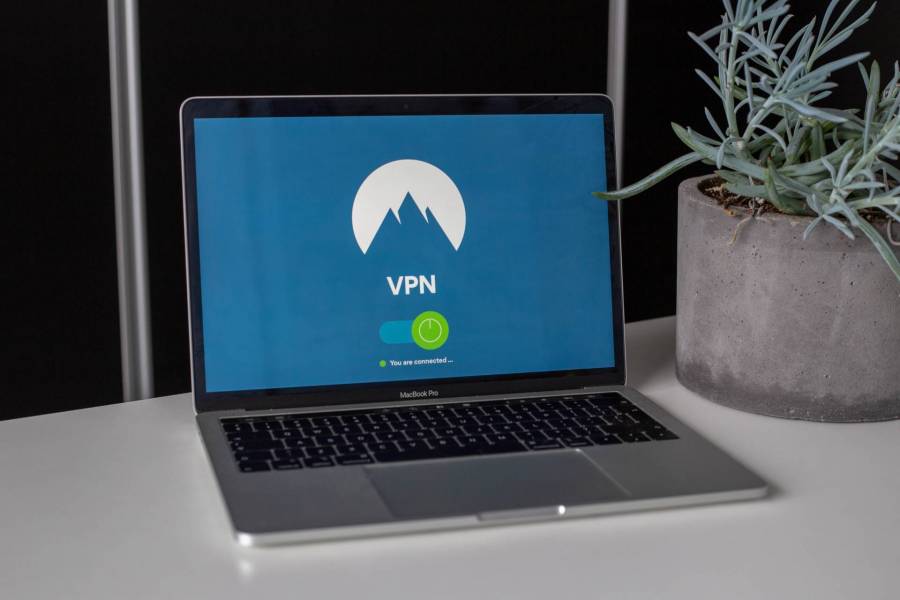
Setting up a secure connection through a VPN server is certainly one of the best information security practices. Simply speaking, any data you send to or receive from the Internet would be routed through an additional server. This is a good way to improve privacy, especially when using public Wi-Fi networks.

This brings us to the always-on VPN option that’s available on Android. Generally speaking, you don’t need VPN at home or when browsing on a mobile network (provided you trust its operator). However, there’s a way to make things work optimally using a whitelist. The latter option is available through most VPN clients and allows you to choose trusted Wi-Fi and mobile networks where a VPN connection isn’t necessary. On all other networks, VPN would turn on automatically.

#8. Turn off USB debugging

You shouldn’t have it on in the first place if you’re not a mobile developer. Simply speaking, USB debugging is a special mode in which your phone allows access to certain parts of its storage when connected via USB to a computer.

When you have this option on, it’s a security risk for your device. To change it, you need to so go to Settings — Developer options, and check that USB debugging is turned off. This won’t affect your ability to connect your phone to a PC to copy files or tether the Internet connection.

#9. Disable location tracking if necessary

Having your location data accessible for various apps and services on your phone — from navigation to ordering takeaway — is often very convenient. In some cases, however, you may want to make sure this data is not being accessed, collected and stored anywhere. This would be a sensible thing to do when the location itself gives up sensitive data about you, like a hospital, or entertainment venue, or even a certain city or country.

In order to block geopositioning as much as possible without actually turning off the phone, follow these two steps.

First, turn off system-level location tracking and make sure no apps have the permissions to access your location data. Head to Settings — Security to do the former and Settings — Apps — App permissions — Location to do the latter. The reason to do both of these steps is to make sure you won’t accidentally allow any app to access your geopositioning data from a dialogue window.

Second, don’t use Wi-Fi, and set up a VPN killswitch. Even with GPS location tracking off, any app could theoretically use your external IP address and/or the names of Wi-Fi networks in the vicinity to figure out your location, often with GPS-like precision. To avoid that, keep your Wi-Fi module off and your VPN client on. As an additional precaution, most VPN clients offer a killswitch option. It means that any traffic that’s not going through a VPN would be automatically blocked.

#10. Use hardware 2FA

Hardware-based two-factor authentication (2FA) is arguably the most failsafe way to protect your accounts in various apps and online services. While traditional 2FA used to rely mostly on one-use passcodes delivered via text messages, SIM swapping has made it extremely insecure.

Another traditional implementation of 2FA is via a mobile app like Google Auth. However, if you lose or break your phone, it can be very complicated to set it up again.

With a hardware key, you can authorize online by connecting the key to your device via NFC, USB-C, or Lightning port. If you lose your phone, you can still use your key for authentication on another one. If you lose the key itself, removing it from your online accounts only takes a few clicks.

Let’s sum things up. It is certainly possible to make your Android device reasonably secure without making everyday use extremely inconvenient. Generally speaking, you can avoid most of the threats by only downloading apps from trusted sources, choosing a secure authentication method, and using a VPN when on public Wi-Fi. Following the rest of the recommendations of this overview will make you an extremely hard target for any malicious actor.

Image Credit: bongkarn thanyakij; Pexels

The post How to Keep Your Android Device Secure Without Succumbing to Paranoia appeared first on ReadWrite.

Securing the Digital Workplace Amidst the COVID-19 Pandemic

Securing the Digital Workplace Amidst the COVID-19 Pandemic

Securing the Digital Workplace Amidst the COVID 19 Pandemic 300x200 1

The COVID-19 pandemic is an ongoing tragedy. Cases have grown exponentially, and the death toll continues to rise. In response to the outbreak, governments worldwide have placed tight restrictions on daily life; restrictions that have also transformed patterns of work. Suddenly, millions of workers have traded the office for a digital workplace

Remote work is nothing new. It has been around for decades, and in recent times up to one in five businesses have made it the norm.

But now, that number is closer to five in five. Many more businesses now have to lean on a suite of cloud platforms in order to keep their employees connected and productive. Microsoft was quick to make premium features of its Teams collaboration platform free for six months to help companies cope. Slack has recorded a net increase of 7,000 customers since the beginning of February; 40% more than it typically has in a whole quarter.

As companies transition wholesale to a digital workspace, the question arises: How can they stay secure? How can they ensure that the third party cloud channels they now rely upon are safe and compliant?

Invisible Employee Interactions

In December of last year, the CEO of a luggage startup Away ended up resigning because she helped foster a toxic working environment on Slack. Lots of factors go into creating such an environment, and 99% of companies manage to use Slack just fine. However, brilliant though the platform is — it does come with some inbuilt challenges that need to be overcome.

In a conventional office setting, managers enjoy automatic oversight of employee behavior.

They can overhear inappropriate remarks, or detect signs of bullying, and swiftly refer incidents to HR. There are a limited amount of private, one-on-one or small group interactions, and so very little goes undetected by the people whose job it is to enforce company policies.

But within collaboration platforms like Slack and Microsoft Teams? In effect, a company’s entire water cooler environment becomes digital, and far less visible.

Instantly, HR and compliance teams are faced with a major visibility issue. They can set company policies, but they have must confront challenges of speed and scale. Some enterprises can produce 40-70,000 Slack messages per day. If they can’t see what staff are saying to one another, it’s difficult to ensure compliance or a safe work environment.

Invisible Customer Interactions

Now that many more companies have moved wholesale to a digital workspace, it isn’t just internal interactions that are the issue.

In an office environment, there are easy ways to monitor and refine how employees are communicating with customers. People overhear or supervise customer calls. Lots of rendezvouses happen in person. Discussions take place at events like conferences or industry meet-ups.

But now? More than ever, companies’ interactions with their customers will be occurring within social media and messaging apps. For most industries, these are the only points of contact they have left. 

Under the COVID-19 lockdown, there are no office appointments, no working lunches, no industry events, no shop floor. All that is left are digital cloud channels. Digital — is where all of the customer communication now lives. 

And once again: Companies have no visibility here. Many industries face stringent regulations regarding how they can communicate with customers. Pharmaceutical companies have to monitor conversations for mentions of adverse events or off-label usage.

Financial services institutions need to watch for promissory language and capture all complaints. Every industry has its own examples. But if compliance teams can’t even properly monitor the platforms that their employees are using, how can they do their jobs?

Too Many Cyberattacks to Track

Malicious cybercriminals are rubbing their hands at the prospect of millions of people trading important and sensitive information online.

As large droves of office employees move to the digital workplace to continue operations during the COVID-19 pandemic, cybersecurity experts are understandably urging remote workers to strengthen their existing security measures.

In a recent public alert, the Cybersecurity and Infrastructure Security Agency (CISA), the cyber division of the US Department of Homeland Security, urged remote employees to secure “devices being used to remote into work environments with the latest software patches and security configurations.”

Software patches are important; this is solid advice. But this isn’t enough, because staying secure is about far more than repelling hackers. 

Some of the worst cyber threats are phishing attacks, malware, and acts of account impersonation. With the velocity of online communications, these threat vectors become nigh impossible to track or react to using most companies’ existing tools.

80% of all data breach incidents reported in 2019 were related to phishing.

Here is a report according to the 2019 Verizon Data Breach Investigations Report. Phishing links can come in across any platform, from WhatsApp to LinkedIn direct messages. When enterprises’ security teams have no way to proactively monitor possible threats, they are flying blind.

Post-Perimeter, AI-Driven Solutions

The challenges of securing the digital workspace in the COVID-19 era all come down to this: we live in a post-perimeter age.

Once, companies established a perimeter, with firewalls and authentication systems, and everything worked mostly fine.

But operations are now distributed across a fragmented digital ecosystem. When your enterprise security is reliant on external, unregulated channels, you have a problem. The intelligence you need to mitigate digital risk and stay secure and compliant, is not as accessible.

The scale and speed of internet communications means that ensuring securing beyond the perimeter is very difficult. The task is beyond human intelligence.

Take “sampling,” for example. Too many digital signals are coming in all the time, and so security teams assess 10% of the overall pool and then apply the results to the other 90%. Taking a sampling works, in a way. But it is far from perfect.

Properly securing the digital workspace can only be done by recruiting AI and machine learning.

AI driven platform protection
Only an AI-driven platform can constantly monitor every relevant digital endpoint.

Only an AI-driven platform can constantly monitor every relevant digital endpoint. Only an AI-driven platform can apply policies to every single message and post, via customizable policies. Modern digital risk protection demands the data aggregation, rapid data processing, and instantaneous execution powers of AI systems.

The Solution? Deploy a Dedicated Digital Risk Platform ASAP

COVID-19 is seeing many enterprises migrate their whole enterprise into cloud channels. But to secure the modern digital workspace, third party cloud channels cannot remain black boxes.

Companies need to have full insight into how their employees are using every digital platform, so they can apply the relevant policies.

They need to be able to scan, and automatically detect and remediate security and compliance issues. 

Until the COVID-19 pandemic ends and normalcy resumes, remote work is the new reality for many businesses. It’s in their best interest to secure their new digital workplace.

The post Securing the Digital Workplace Amidst the COVID-19 Pandemic appeared first on ReadWrite.

Microsoft Aims to Kill Chrome Using Chromium with its New Edge Browser

Microsoft Aims to Kill Chrome Using Chromium with its New Edge Browser

microsoft edge

Microsoft released its new Chromium-based browser earlier this year, but what does this new browser mean for the general users and should they give it a try? Yes, if you spend a good amount of time browsing the Internet and if you’re a little concerned about your privacy.

A web browser amongst others is your gateway to the Internet and thus it knows a lot about you and your habits. Every bit of information you exchange on the Internet parses through the web browser. Having a certain degree of control and transparency over your browsing data and its usage must be appreciated.

The new Edge browser provides you with a simple to find 3 level privacy management tab: Basic, Balanced and Strict to choose from, depending on how comfortable you are with marketers being able to target you with ads. Unsurprisingly, it is much more difficult to get to this setting tab on Chrome.

It is much easier for tracking companies to access your information and make money off it if you’re a Chrome user. Even Firefox provides anti-tracking features but Chrome doesn’t.

With the new Chromium-based Edge browser, Microsoft attempts to revive itself in a space it has been losing for almost a decade. With all the new features and advantages over Chrome, it still faces an uphill battle of winning back its long lost users.

Microsoft edge.

We should not forget that Google is an Ad company. It invests substantially to build and maintain a browser which is the most widely used on the planet. But since it relies on your data for revenue, it almost does next to nothing to prevent tracking of your data even by third parties.

Chrome is and has been the undisputed king in the browser space with a solid engineering team behind the wheels and a loyal user base.

But The Chrome Experience

67 percent of all computer-based browsing is done on Chrome as of January 2020. Google leverages this overwhelming lead to its advantage by selling your data while providing you with free personalized apps and services that use this data extensively.

More than 40 percent of people who buy a Windows machine download Chrome using Internet Explorer as their first major activity on their machine. One of the biggest and less talked about the reason why people switch to Chrome is that they have become used to the look and feel of it and reject anything that feels even scantily different. Kudos to the engineering team at Chrome to manage such patronage.

This is probably why the previous feature-rich Edge with Microsoft’s edge HTML rendering engine failed miserably. It could also be attributed to Chrome beating Firefox substantially with the later having only 4.7 percent market share globally.

With the new Edge, Microsoft acknowledges its boo-boo and looks to get back in the browser space albeit some obscurity.

Living on the Edge

Since the new Edge is based on Google’s Chromium engine, you get the Chrome browsing experience annulling a major reason for losing users.

In testing, the rendering time of Edge is found to be faster than Chrome. The RAM consumption of Edge is found to be less than 14 percent of that of Chrome which could be a major respite for a lot of users as Chrome is known for eating up RAM.

With the seemingly right steps taken by Microsoft using its engineering prowess, it has to win back the users it has lost since the inception of Chromium. The new Edge browser has to outdo Chrome consistently in the time to come and create an ardent user base like it has done recently in a very short time with Visual Studio Code.

Microsoft uses Windows which accounts for almost 80% of the operating system market to prompt users to switch to Edge. It has done this previously with aggression at times but has come to no avail.

Interesting times ahead

By moving to Chromium, Microsoft interestingly plays it in the hands of Google, the owner of the Chromium repository, and hence decides the engineering direction the project takes. It might surprise a few but Microsoft is already invested in Chromium with Visual Studio Code and Microsoft Teams which are based on Electron, a Chromium-based framework.

While Microsoft would again use Windows alongside other marketing strategies to push its baby in the hands of users, Google has the stewardship on the engineering decisions and a throng of lawyers to monitor any wrong practice by MSFT.

It would be interesting to see Microsoft market Edge and leverage it for its consumer products while Google tackles this push offering a successful but virtually identical product.

The post Microsoft Aims to Kill Chrome Using Chromium with its New Edge Browser appeared first on ReadWrite.

WP to LinkedIn Auto Publish Powered By : XYZScripts.com