Imagine you’re going about your day when suddenly you receive a text from the CEO. The head of the company is asking for your help. They’re out doing customer visits and someone else dropped the ball in providing gift cards. The CEO needs you to buy six $200 gift cards and text the information right away.
The message sender promises to reimburse you before the end of the day. Oh, and by the way, you won’t be able to reach them by phone for the next two hours because they’ll be in meetings. One last thing, this is a high priority. They need those gift cards urgently.
Would this kind of request make you pause and wonder? Or would you quickly pull out your credit card to do as the message asked?
A surprising number of employees fall for this gift card scam. There are also many variations. Such as your boss being stuck without gas or some other dire situation that only you can help with.
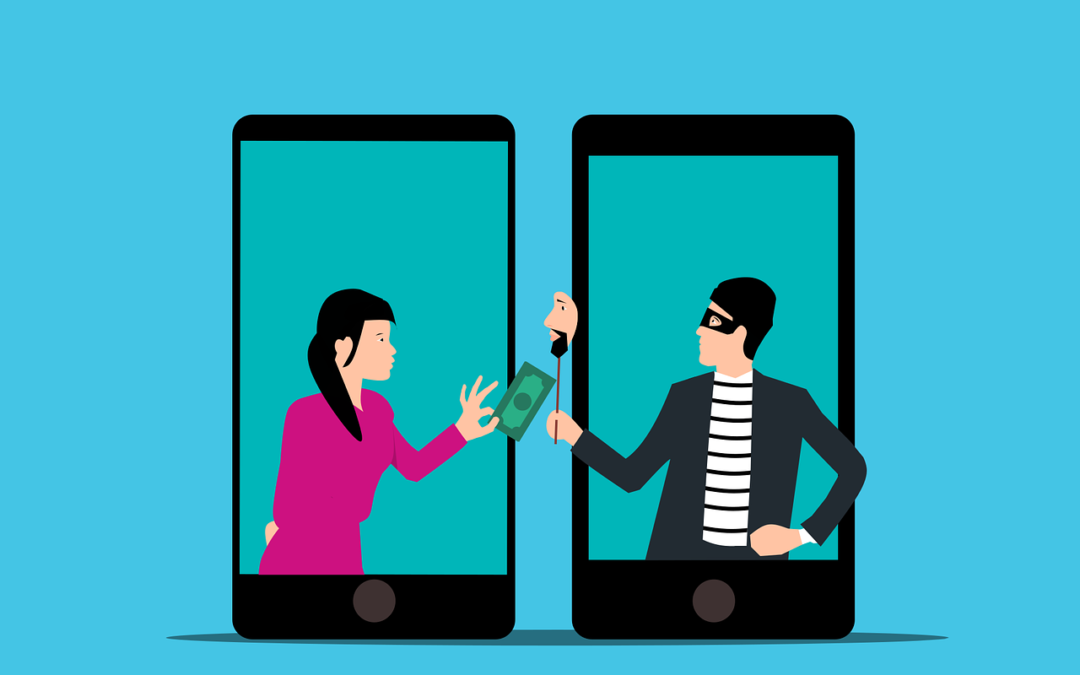
This scam can come by text message or via email. What happens is that the unsuspecting employee buys the gift cards. They then send the numbers back. They find out later that the real company CEO wasn’t the one that contacted them. It was a phishing scammer.
The employee is out the cash.
Without proper training, 32.4% of employees are prone to fall for a phishing scam.
Why Do Employees Fall for Phishing Scams?
Though the circumstances may be odd, many employees fall for this gift card scam. Hackers use social engineering tactics. They manipulate emotions to get the employee to follow through on the request.
Some of these social engineering tactics illicit the following:
The employee is afraid of not doing as asked by a superior
The employee jumps at the chance to save the day
The employee doesn’t want to let their company down
The employee may feel they can advance in their career by helping
The scam’s message is also crafted in a way to get the employee to act without thinking or checking. It includes a sense of urgency. The CEO needs the gift card details right away. Also, the message notes that the CEO will be out of touch for the next few hours. This decreases the chance the employee will try to contact the real CEO to check the validity of the text.
Illinois Woman Scammed Out of More Than $6,000 from a Fake CEO Email
Variations of this scam are prevalent and can lead to significant financial losses. A company isn’t responsible if an employee falls for a scam and purchases gift cards with their own money.
In one example, a woman from Palos Hills, Illinois lost over $6,000. This was after getting an email request from who she thought was her company’s CEO.
The woman received an email purporting to be from her boss and company CEO. It stated that her boss wanted to send gift cards to some selected staff that had gone above and beyond.
The email ended with “Can you help me purchase some gift cards today?” The boss had a reputation for being great to employees, so the email did not seem out of character.
The woman bought the requested gift cards from Target and Best Buy. Then she got another request asking to send a photo of the cards. Again, the wording in the message was very believable and non-threatening. It simply stated, “Can you take a picture, I’m putting this all on a spreadsheet.”
The woman ended up purchasing over $6,500 in gift cards that the scammer then stole. When she saw her boss a little while later, her boss knew nothing about the gift card request. The woman realized she was the victim of a scam.
Tips for Avoiding Costly Phishing Scams
Always Double Check Unusual Requests
Despite what a message might say about being unreachable, check in person or by phone anyhow. If you receive any unusual requests or one relating to money, verify it. Contact the person through other means to make sure it’s legitimate.
Don’t React Emotionally
Scammers often try to get victims to act before they have time to think. Just a few minutes of sitting back and looking at a message objectively is often all that’s needed to realize it’s a scam. Don’t react emotionally, instead ask if this seems real or is it out of the ordinary.
Get a Second Opinion
Ask a colleague, or better yet, your company’s IT service provider, to take look at the message. Getting a second opinion keeps you from reacting right away. It can save you from making a costly judgment error.
Need Help with Employee Phishing Awareness Training?
Phishing keeps getting more sophisticated all the time. Make sure your employee awareness training is up to date. Give us a call today to schedule a training session to shore up your team’s defenses.
Misconfiguration of cloud solutions is often overlooked when companies plan cybersecurity strategies. Cloud apps are typically quick and easy to sign up for. The user often assumes that they don’t need to worry about security because it’s handled.
This is an incorrect assumption because cloud security is a shared model. The provider of the solution handles securing the backend infrastructure. But the user is responsible for configuring security settings in their account properly.
The problem with misconfiguration is huge. It’s the number one cause of cloud data breaches. It’s also an unforced error. Misconfiguration means that a company has made a mistake. It hasn’t adequately secured its cloud application.
Perhaps they gave too many employees administrative privileges. Or, they may have neglected to turn on a security function. One that prevented the downloading of cloud files by an unauthorized user.
Misconfiguration covers a wide range of negligent behavior. It all has to do with cloud security settings and practices. A finding in The State of Cloud Security 2021 report shed light on how common this issue is. 45% of organizations experience between 1 and 50 cloud misconfigurations per day.
Some of the main causes of misconfiguration are:
Lack of adequate oversight and controls
A team lacking security awareness
Too many cloud APIs to manage
No adequate cloud environment monitoring
Negligent insider behavior
Not enough expertise in cloud security
Use the tips below to reduce your risk of a cloud data breach and improve cloud security.
Enable Visibility into Your Cloud Infrastructure
Do you know all the different cloud apps employees are using at your business? If not, you’re not alone. It’s estimated that shadow IT use is approximately 10x the size of known cloud use.
When an employee uses a cloud app without authorization, it’s considered “shadow IT.” This is because the app is in the shadows so to speak, outside the purview of the company’s IT team.
How can you protect something you don’t know about? This is why shadow cloud applications are so dangerous. And why they often result in breaches due to misconfiguration.
Gain visibility into your entire cloud environment, so you know what you need to protect. One way you can do this is through a cloud access security application.
Restrict Privileged Accounts
The more privileged accounts you have, the higher the risk of a misconfiguration. There should be very few users that can change security configurations. You don’t want someone that doesn’t know better to accidentally open a vulnerability. Such as removing a cloud storage sharing restriction. It could leave your entire environment a sitting duck for hackers.
Audit privileged accounts in all cloud tools. Then, reduce the number of administrative accounts to a least needed to operate.
Put in Place Automated Security Policies
Automation helps mitigate human error. Automating as many security policies as possible helps prevent cloud security breaches.
For example, if you use a feature like sensitivity labels in Microsoft 365, you can set a “do not copy” policy. It will follow the file through each supported cloud application. Users don’t need to do anything to enable it once you put the policy in place.
Use a Cloud Security Audit Tool (Like Microsoft Secure Score)
How secure is your cloud environment? How many misconfigurations might there be right now? It’s important to know this information so you can correct issues to reduce risk.
Use an auditing tool, like Microsoft Secure Score. You want a tool that can scan your cloud environment and let you know where problems exist. It should also be able to provide recommended remediation steps.
Set Up Alerts for When Configurations Change
Once you get your cloud security settings right, they won’t necessarily stay that way. Several things can cause a change in a security setting without you realizing it. These include:
An employee with elevated permissions accidentally changes them
A change caused by an integrated 3rd party plug-in
Software updates
A hacker that has compromised a privileged user credential
Be proactive by setting up alerts. You should have an alert for any significant change in your cloud environment. For example, when the setting to force multi-factor authentication gets turned off.
If an alert is set up, then your team knows right away when a change occurs to an important security setting. This allows them to take immediate steps to research and rectify the situation.
Have a Cloud Specialist Check Your Cloud Settings
Business owners, executives, and office managers aren’t cybersecurity experts. No one should expect them to know how to configure the best security for your organization’s needs.
It’s best to have a cloud security specialist from a trusted IT company check your settings. We can help ensure that they’re set up to keep your data protected without restricting your team.
Improve Cloud Security & Lower Your Chances for a Data Breach
Most work is now done in the cloud, and companies store data in these online environments. Don’t leave your company at risk by neglecting misconfiguration. Give us a call today to set up a cloud security assessment.
There are a lot of things that have changed since the invention of the internet. One of these is how we bank and access our accounts. You used to have to go into a local bank branch to make deposits and withdrawals. Now, you can take a picture of a check and deposit it from your phone.
Approximately 73% of people around the world use some form of online banking at least once a month. People have never had such convenient account access. But that convenience can come at a cost.
In 2021, account takeover fraud increased by 90%. New account fraud jumped a whopping 109%. As the ease of online banking has increased, so has banking-related cybercrime.
If someone breaches your Facebook account, it can be a real pain. But, if a hacker breaches your bank account, it can be devastating. It can mean significant losses. Losses that you may not be able to recoup from your financial institution.
In this article, we’ll take a look at the mistakes people make that leave their accounts at risk. Then, we’ll go over some important tips on how to keep your bank account better protected.
Mistakes That Allow Criminals to Access Your Account
Not Enabling Two-factor Authentication
Two-factor authentication (2FA) is a simple process that packs a big punch. When you enable this setting in an online account, it requires an extra step to gain access. That step usually consists of receiving a one-time passcode (OTP) by SMS and entering that at login.
Many people make the mistake of leaving this disabled. They either don’t know it’s there or they think it’s too inconvenient. But leaving this setting off makes it much easier for a bad actor to breach your account.
Falling for a Phishing Scam
There are several types of phishing scams that target online banking. Cyber criminals send emails that look like they come from your bank. They’ll even promise incredibly low rates on credit cards.
Other scams can involve warning you of unauthorized account activity. But when you click the link to log in, you’re actually on a fake page. One designed to look just like your normal bank website.
These are just a few ways that scammers can get your online banking login details. Once they have them, they’ll act immediately to get whatever they can.
Using Easy-to-Guess Passwords
If your account password is easy to remember, it’s also often easy to guess. Using weak passwords is a common mistake that enables many cyber criminals.
Some best practices for passwords include:
Make them at least 10 characters long
Include at least one number
Include at least one symbol
Include at least one upper-case letter
Don’t make them personal (e.g., don’t use your birthdate, etc.)
Downloading Unsafe Mobile Apps
Banking trojans are often hidden in malicious mobile apps. These apps can look like something as innocent as a task manager. But, once installed, banking trojans seek out any details they can find. They are looking for banking and wallet apps.
Logging Into Online Banking While on Public Wi-Fi
One surefire way to give away your online banking password is to log in while on public Wi-Fi. Hackers hang out on public hot spots and spy on the activity of others. You should never type in a password or other sensitive details when connected to public Wi-Fi.
Tips for Improving Online Banking Security
Turn On Two-Factor Authentication
Enable two-factor authentication in your online banking account. This is also known as multi-factor authentication or two-step verification. According to Microsoft, it can block 99.9% of fraudulent account login attempts.
Set Up Banking Alerts
Time is of the essence when an intruder breaches your account. The faster you can notify your bank of the breach, the better. You could reduce the impact on you by having your account locked down immediately.
Set up banking alerts through your online banking. These can include things like low-balance alerts and login alerts.
Install an Antivirus & DNS Filtering On Your PC & Mobile Device
It’s important to have reliable antivirus software on your PC and mobile device. Many people don’t think about protecting their phones in this way. Yet, they shop online and bank via mobile devices.
It’s also good to use a DNS filter. This is a filter that protects you from going to dangerous phishing sites by blocking them.
Take Phishing Training Classes
Do you know how to identify phishing? Are you up on all the newest scams? You can make yourself less vulnerable by taking some phishing awareness classes. There are many of these for free online. You can also contact us for more personalized training options.
Knowing how to spot phishing via text, email, and phone can help you avoid becoming a scam victim.
Get Help Protecting Your Family from Scams
There are some key digital solutions we can put in place to keep your family safer from online threats. Give us a call today to schedule a chat about online security.
No business wants to suffer a data breach. But unfortunately, in today’s environment, it’s difficult to completely avoid them. Approximately 83% of organizations have experienced more than one data breach. (IBM Security 2022 Cost of a Data Breach Report)
These breaches hurt businesses in many ways. First, there is the immediate cost of remediating the breach. Then, there are the lost productivity costs. You can add lost business on top of that, and lost customer trust. A business could also have extensive legal costs associated with a breach.
According to IBM Security’s report, the cost of a data breach climbed again in 2022. The global cost of one breach is now $4.35 million, up 2.6% from last year. If your business is in the U.S., the cost rises to $9.44 million. In Canada, the average data breach costs companies $5.64 million.
Costs for smaller companies tend to be a little lower. But breaches are often more devastating to SMBs. They don’t have the same resources that larger companies do to offset all those costs.
It’s estimated that 60% of small companies go out of business within six months of a cybersecurity breach.
Companies don’t need to resign themselves to the impending doom of a data breach. There are some proven tactics they can take to mitigate the costs. These cybersecurity practices can limit the damage of a cyberattack.
All these findings come from the IBM Security report. They include hard facts on the benefits of bolstering your cybersecurity strategy.
Cybersecurity Tactics to Reduce the Impact of a Breach
Use a Hybrid Cloud Approach
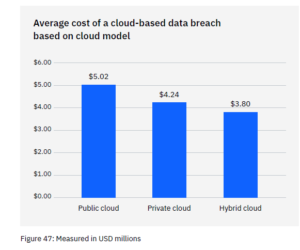
Most organizations use the cloud for data storage and business processes. Researchers found that 45% of all data breaches happen in the cloud. But all cloud strategies are not created equally.
Breaches in the public cloud cost significantly more than those in a hybrid cloud. What is a hybrid cloud? It means that some data and processes are in a public cloud, and some are in a private cloud environment.
What some may find surprising is that using a hybrid cloud approach was also better than a private cloud.
Put in Place an Incident Response Plan & Practice It
You don’t need to be a large enterprise to create an incident response (IR) plan. The IR plan is simply a set of instructions. It’s for employees to follow should any number of cybersecurity incidents occur.
Here is an example. In the case of ransomware, the first step should be disconnecting the infected device. IR plans improve the speed and effectiveness of a response in the face of a security crisis.
Having a practiced incident response plan reduces the cost of a data breach. It lowers it by an average of $2.66 million per incident.
Adopt a Zero Trust Security Approach
Zero trust is a collection of security protocols that work together to fortify a network. An example of a few of these are:
Multi-factor authentication
Application safelisting
Contextual user authentication
Approximately 79% of critical infrastructure organizations haven’t adopted zero trust. Doing so can significantly reduce data breach costs. Organizations that don’t deploy zero trust tactics pay about $1 million more per data breach.
Use Tools with Security AI & Automation
Using the right security tools can make a big difference in the cost incurred during a data breach. Using tools that deploy security AI and automation brought the biggest cost savings.
Data breach expense lowered by 65.2% thanks to security AI and automation solutions. These types of solutions include tools like advanced threat protection (ATP). They can also include applications that hunt out threats and automate the response.
How to Get Started Improving Your Cyber Resilience
Many of these ways to lower data breach costs are simply best practices. You can get started by taking them one at a time and rolling out upgrades to your cybersecurity strategy.
Working with a trusted IT provider, put together a roadmap. Address the “low-hanging fruit” first. Then, move on to longer-term projects.
As an example, “low-hanging fruit” would be putting multi-factor authentication in place. It’s low-cost and easy to put in place. It also significantly reduces the risk of a cloud breach.
A longer-term project might be creating an incident response plan. Then, you would set up a schedule to have your team drill on the plan regularly. During those drills, you could work out any kinks.
Need Help Improving Your Security & Reducing Risk?
Working with a trusted IT partner takes a lot of the security burden off your shoulders. Give us a call today to schedule a chat about a cybersecurity roadmap.