In today's ever-evolving digital landscape, small businesses have more opportunities than ever. Many of these call for leveraging technology to their advantage. Embracing the right tech trends can help businesses compete. It enables them to streamline operations, enhance customer experiences, and fuel growth.
But it can be confusing knowing which routes to take. Most small businesses need to choose the route that is going to bring the biggest return.
Below, we’ll explore five small business tech trends. These trends have the potential to drive success. As well as propel your business forward in an increasingly competitive market.
1. Cloud Computing: Expanding Possibilities
Cloud computing has emerged as a game-changer for businesses of all sizes. And some believe small businesses are among the most benefitted. 82% of small to medium businesses report reduced costs after adopting cloud tools.
The cloud offers many benefits. It’s a cost-effective and scalable solution for data storage, software access, and collaboration. By migrating to the cloud, small businesses can save. They cut the need for on-premises infrastructure. This reduces maintenance costs and gives enhanced flexibility.
Also, cloud-based tools and platforms enable teams to work remotely. This can promote collaboration and improve productivity. Working in the cloud offers access to real-time data and apps from any location. This enables small businesses to make informed decisions faster. They can also respond to market changes with agility.
2. Artificial Intelligence: Automating Efficiency
Artificial Intelligence (AI) has revolutionized the way businesses operate. This year alone, ChatGPT has completely transformed many business apps. We cannot overstate AI’s potential benefits for small businesses.
AI-powered tools and algorithms can automate routine tasks. Such as data entry, customer service, and inventory management. This frees up valuable time for employees to focus on higher-value activities.
Chatbots, for instance, enable small businesses to provide 24/7 customer support. All without the need for more staff or paying overtime hours.
AI also empowers businesses to gain actionable insights from vast amounts of data. This helps them optimize processes, personalize marketing strategies, and enhance customer experiences.
Embracing AI technologies can give small businesses a competitive edge. It does this by boosting efficiency, reducing costs, and improving decision-making.
3. E-commerce and Mobile Commerce: Expanding Reach
The rise of e-commerce and mobile commerce has opened up new avenues for small businesses. They can now easily reach a global audience. Using websites and apps, companies can sell anywhere at any time.
It’s easier than ever to put up a secure payment gateway and take payments online. These “plug-and-play” e-commerce sites and apps can create a seamless user experience. This allows small businesses to build trust and encourage repeat purchases.
Businesses can easily understand customer preferences by leveraging data analytics. They can also optimize inventory management and personalize marketing campaigns.
By embracing e-commerce and mobile commerce, small businesses can grow quickly. They can extend their reach beyond geographical boundaries. As well as tap into new markets, thereby fueling growth opportunities.
4. Data Security: Safeguarding Trust
As businesses increasingly rely on digital technologies, data security becomes paramount. Small businesses are just as vulnerable to cyber threats as larger enterprises. This makes it essential to prioritize data security measures.
46% of all data breaches impact businesses with less than 1,000 employees.
It’s important to put robust cybersecurity practices in place. This includes things like:
Encryption
Multi-factor authentication
Regular data backups
Endpoint protection
Identity and access management
Advanced threat protection
Additionally, two more tactics to proactively manage risks include:
Staying informed about emerging threats
Investing in employee training
Customers value businesses that focus on their data security. A strong security posture can instill trust and confidence. This leads to long-term customer loyalty and positive brand reputation.
5. Automation and Workflow Integration: Streamlining Operations
Automating business processes can significantly streamline operations. When small businesses integrate workflows they save time and money. Workflow automation eliminates repetitive manual tasks. It also reduces human error and enhances efficiency.
Think about integrating various systems and applications. Such as customer relationship management (CRM), project management, and accounting software. Integration can end silos and ensure seamless information flow across different departments.
Other benefits include:
Enabling better coordination
Fostering collaboration
Optimizing resource allocation
Improving productivity
Enhancing customer satisfaction
Small businesses that leverage automation and workflow integration gain a competitive advantage. They operate more efficiently and deliver superior experiences to their customers.
Take an Important Step Toward Digital Growth
In today's digital era, small businesses have a ton of tech tools and trends at their disposal. But it takes guidance to know what to do and how to do it.
While embracing cloud computing, AI, e-commerce, data security, and automation can help. To stay competitive small businesses need a clear and affordable path. One that makes sense for their business goals.
We can be your digital transformation guide.
Give us a call today to schedule a chat about tech solutions to fuel your growth.
LinkedIn has become an invaluable platform for professionals. People use it to connect, network, and explore business opportunities. But with its growing popularity have come some red flags. There has been an increase in the presence of fake LinkedIn sales bots.
These bots impersonate real users and attempt to scam unsuspecting individuals. This is one of the many scams on LinkedIn. According to the FBI, fraud on LinkedIn poses a “significant threat” to platform users.
In this blog post, we will delve into the world of fake LinkedIn sales bots. We’ll explore their tactics and provide you with valuable tips. You’ll learn how to spot and protect yourself from these scams. By staying informed and vigilant, you can foster a safer LinkedIn experience.
Identifying Fake LinkedIn Sales Connections
Social media scams often play on emotions. Who doesn’t want to be thought of as special or interesting? Scammers will reach out to connect. That connection request alone can make someone feel wanted. People often accept before researching the person’s profile.
Put a business proposition on top of that, and it’s easy to fool people. People that are looking for a job or business opportunity may have their guard down. There is also an inherent trust people give other business professionals. Many often trust LinkedIn connections more than Facebook requests.
How can you tell the real requests from the fake ones? Here are some tips on spotting the scammers and bots.
Incomplete Profiles and Generic Photos
Fake LinkedIn sales bots often have incomplete profiles. They’ll have very limited or generic information. They may lack a comprehensive work history or educational background. Additionally, these bots tend to use generic profile pictures. Such as stock photos or images of models.
If a profile looks too perfect or lacks specific details, it could be a red flag. Genuine LinkedIn users usually provide comprehensive information. They do this to establish credibility and foster trust among their connections.
Impersonal and Generic Messages
One of the key characteristics of fake sales bots is their messaging approach. It's often impersonal and generic. These bots often send mass messages that lack personalization. They may be no specific references to your profile or industry. They often use generic templates or scripts to engage with potential targets.
Legitimate LinkedIn users, typically tailor their messages to specific individuals. They might mention shared connections, recent posts, or industry-specific topics. Exercise caution If you receive a message that feels overly generic. Or one that lacks personalization. Be sure to scrutinize the sender's profile before proceeding further.
Excessive Promotional Content and Unrealistic Claims
Fake LinkedIn sales bots are notorious for bombarding users. You’ll often get DMs with excessive promotional content and making unrealistic claims. These bots often promote products or services aggressively. Usually without offering much information or value.
They may promise overnight success, incredible profits, or instant solutions to complex problems. Genuine professionals on LinkedIn focus on building relationships. They try to provide valuable insights and engage in meaningful discussions. Instead of resorting to constant self-promotion.
Be wary of connections that focus solely on selling. And that don’t offer any meaningful content or engagement.
Inconsistent or Poor Grammar and Spelling
When communicating on LinkedIn, pay attention to the grammar and spelling of messages. You may dismiss an error from an international-sounding connection, but it could be a bot.
Fake LinkedIn sales bots often display inconsistent or poor grammar and spelling mistakes. These errors can serve as a clear sign that the sender is not genuine. Legitimate LinkedIn users typically take pride in their communication skills. They try to maintain a high standard of professionalism.
If you encounter messages with several grammatical errors or spelling mistakes, exercise caution. Investigate further before engaging with the sender.
Unusual Connection Requests and Unfamiliar Profiles
Fake LinkedIn sales bots often send connection requests to individuals indiscriminately. They may target users with little regard for relevance or shared professional interests.
Be cautious when accepting connection requests from unfamiliar profiles. Especially if the connection seems unrelated to your industry or expertise.
Take the time to review the requesting profile. Check their mutual connections, and assess the relevance of their content. Legitimate LinkedIn users are more likely to have a connection. They typically send connection requests to others with shared interests or professional networks.
Need Training in Online Security?
Spotting fake LinkedIn sales bots is crucial for maintaining a safe online experience. By being vigilant, you can protect yourself from potential scams.
AI is causing an increase in the sophistication of scams. You may need some help navigating what’s real and fake. Employees can also benefit by learning social media security.
Need help with personal or team cybersecurity training? We have a team of friendly experts that can improve your scam detection skills.
As technology continues to advance, so does the landscape of design tools. Microsoft has been a company at the forefront of business apps. Microsoft 365 began with about seven apps. It now offers new users access to over 20.
One of the newest ones added is Microsoft Designer. This quick-and-easy design tool has caught the attention of designers and professionals alike. You can use it whether you're a graphic pro, marketer, or small business owner. Or someone that simply wants to make a funny meme.
Microsoft Designer offers a range of features to streamline your design process. If you haven’t used it yet, you may want to check it out. With AI features and an easy interface, it can elevate your design game. Not to mention saving time and money creating business graphics.
Let’s explore the key features.
Intuitive and User-Friendly Interface
Microsoft Designer boasts an intuitive and user-friendly interface. This makes it accessible to both beginners and experienced designers. The tool provides a clean and organized workspace. It allows you to focus on your design without distractions.
Its user-friendly features include things like:
Drag-and-drop functionality
Contextual menus
Easy navigation
Text prompts to start your design
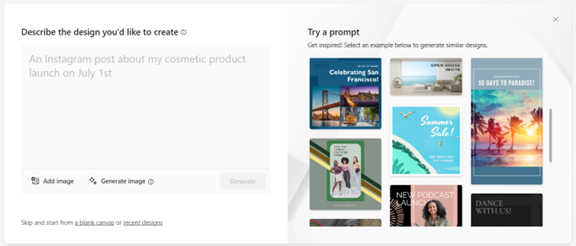
The first prompt it asks is “Describe the design you’d like to create.” This makes it simple for someone with no design experience to use it. Based on your prompt, the system can leverage AI to generate graphics. You can also upload your own.
Microsoft Designer Interface
Comprehensive Design Templates and Assets
Microsoft Designer has several stand-out features. One of them is its extensive collection of templates and assets. It has a wide range of professionally crafted templates. These enable you to kickstart your design projects quickly.
Whether you need a business card, flyer, or social media post, this app has you covered. Additionally, the tool offers a vast library of assets. These include:
High-quality images
Icons
Fonts
Color palettes
You can use these to create visually stunning designs. Ones that align with your brand identity. The abundance of design assets gives you creative freedom and flexibility. You can have fun bringing your vision to life.
Smart Layout Suggestions and Design Recommendations
Microsoft Designer goes beyond being a mere design tool. It’s a knowledgeable design assistant. The tool employs artificial intelligence. It can analyze your design and provide smart layout suggestions and recommendations. So even if making images isn’t “your thing,” you can make something decent.
The AI help is useful for those who may be new to design or seeking inspiration. Your “design assistant” can offer optimal font pairings, appropriate image placements, and more.
Microsoft Designer helps you make informed design choices. This elevates the visual impact of your creations. It also keeps you from spending hours on one design.
Seamless Collaboration and Integration
Collaboration is essential in today's digital workspace. Microsoft Designer understands this need. The tool offers seamless collaboration capabilities. It allows several users to work on the same design project simultaneously.
You can easily share your designs with team members or clients. As well as get real-time feedback and edits. Furthermore, Microsoft Designer integrates seamlessly with other Microsoft Office applications. Such as PowerPoint and Word. This creates a cohesive workflow across different design and documentation tasks. The ability to collaborate ensures efficient teamwork. The integration with other tools enhances productivity.
Accessibility and Cross-Platform Support
Microsoft Designer recognizes the importance of accessibility and cross-platform compatibility. The tool is available both as a web application and as a desktop application. You can use it on Windows and Mac.
Use it working on your desktop computer or from a mobile device. The tool also adheres to accessibility standards. This means it’s inclusive and usable for individuals with diverse needs.
What Does It Autogenerate?
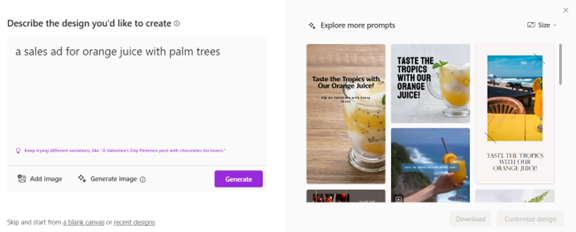
Just for fun, let’s see what we get with the AI-generated option. We’ll describe our design as, “a sales ad for orange juice with palm trees.”
In just a few seconds, this is what Microsoft Designer generated as options.
While some images might not be relevant, it gives many options that are. If you’re not getting what you want the first time, rephrase your prompt.
If you're seeking a user-friendly design tool, Microsoft Designer is worth exploring. Whether you're a seasoned designer or a beginner, it can save you time and money.
Learn More About Our Microsoft 365 Support
Microsoft 365 is a vast universe of apps. Ones that can lower costs and boost your productivity. From the Office suite to Intune for endpoint management, it’s a valuable asset.
Need help with M365 questions? Looking for setup and security support? We can help. Give us a call today to schedule a chat about our Microsoft support services.
Cybersecurity has become paramount for businesses and individuals alike. Cyber threats abound, and data breaches and malware attacks are costly. Attacks come from all sectors, including the cloud tools you use every day.
The average employee uses 36 cloud-based services daily. Managing access to sensitive data and resources has become crucial. It's a vital piece to maintaining robust security. One breached account in a business app can lead to significant consequences.
Login credentials are lucrative for hackers. Various online accounts can be a goldmine on the dark web. For example, an email administrator login can fetch between $500 to $140,000.
You need to ensure you're addressing access management in your cybersecurity strategy. Otherwise, you could suffer serious financial consequences. Not to mention the loss of reputation that comes with a data breach.
We’ll look at six reasons access management has become essential to good data security. It plays a pivotal role in safeguarding valuable assets and ensuring data integrity.
Why Identity & Access Management (IAM) Should Be a High Priority
Mitigating Insider Threats
Insider threats can result from malicious actions or unintentional errors. They can come from employees within an organization or their breached accounts. IAM solutions enable businesses to install granular access controls and permissions. This ensures that employees have access only to the data necessary for their roles.
By minimizing excessive privileges organizations can reduce insider threats. Access management also provides visibility into user activities. It enables businesses to detect and respond to suspicious behavior in real-time.
Strengthening Data Protection
Data breaches can have severe consequences for businesses. They can lead to things like:
Reputational damage
Financial losses
Regulatory penalties
Permanent closure for those that can’t recover
Effective access management helps strengthen data protection. It does this by limiting access to sensitive information. As well as enforcing strong authentication measures.
Multi-factor authentication, encryption, and user authentication limit who can access what in a system. Access management solutions also enable organizations to track and control data transfers. This helps ensure that data remains secure throughout its lifecycle.
By implementing robust access controls, businesses can mitigate the risks. They reduce the chance of unauthorized data access. As well as protect their most valuable assets.
Enhancing Regulatory Compliance
Compliance with data privacy laws is a top priority for many organizations. IAM solutions play a vital role in ensuring regulatory compliance. They provide necessary controls and audit trails.
IAM tools also help companies adopt best practices, such as:
Role-based access control (RBAC)
Least privilege principles
Contextual multi-factor authentication
Using access management, businesses can show compliance with regulatory requirements. IAM solutions also help with regular access reviews. They enable organizations to maintain an accurate record of user access and permissions. This is essential for regulatory audits and assessments.
Streamlining User Provisioning and Deprovisioning
Managing user accounts and access privileges manually can be a time-consuming process. It’s also prone to human error. Just one miskeyed entry can increase the risk of an account breach.
Access management solutions automate user provisioning and de-provisioning. This ensures that employees have appropriate access rights throughout their employment lifecycle.
When an employee joins an organization, access management simplifies the onboarding process. It quickly provisions the necessary user accounts and permissions based on their role.
When an employee leaves the organization, IAM tools ensure prompt de-provisioning of accounts. As well as the revoking of access rights. This reduces the risks of dormant or unauthorized accounts.
Remember the big data breach at Colonial Pipeline a few years back? The breach originated from an old unused business VPN account. One that had never been de-provisioned properly.
Streamlining user provisioning and de-provisioning enhances security and improves operational efficiency.
Enabling Secure Remote Access
Two things have largely changed the look of the traditional “office” in the last decade. These are the rise of remote work and the increasing reliance on cloud services. This change makes secure remote access vital for organizations.
IAM solutions provide secure authentication and authorization mechanisms for remote users. This enables them to access corporate resources and data securely. IAM is there whether employees are working from home, traveling, or accessing data via mobile. Access management ensures that they can do so without compromising security.
It includes features like:
Virtual private networks (VPNs)
Single sign-on (SSO)
Multi-factor authentication (MFA)
These help secure remote access. While also maintaining the integrity and confidentiality of corporate data.
Improving Productivity
Using an identity and access management system can boost productivity. Imagine how much time your HR or IT team spends provisioning user accounts. It can take a significant amount of time to add all those login credentials. Not to mention deciding on user access permissions in each tool.
IAM systems automate this entire process. Using role-based access protocols, they can immediately assign the right level of access. If an employee leaves, the system can also immediately revoke access. This saves your administrative team considerable time and effort.
Get Help Putting a Strong IAM Solution in Place
Access management has evolved into a critical component of cybersecurity. It helps mitigate insider threats, strengthen data protection, enhance regulatory compliance, and more. We can help you put in place an IAM system that works for you.
Give us a call today to schedule a chat about beefing up your access security.
In today's digital landscape, cybersecurity threats continue to evolve. They pose significant risks to individuals and organizations alike. One such threat gaining prominence is zero-click malware. This insidious form of malware requires no user interaction. It can silently compromise devices and networks.
One example of this type of attack happened due to a missed call. That’s right, the victim didn’t even have to answer. This infamous WhatsApp breach occurred in 2019, and a zero-day exploit enabled it. The missed call triggered a spyware injection into a resource in the device’s software.
A more recent threat is a new zero-click hack targeting iOS users. This attack initiates when the user receives a message via iMessage. They don’t even need to interact with the message of the malicious code to execute. That code allows a total device takeover.
Below, we will delve into what zero-click malware is. We’ll also explore effective strategies to combat this growing menace.
Understanding Zero-Click Malware
Zero-click malware refers to malicious software that can do a specific thing. It can exploit vulnerabilities in an app or system with no interaction from the user. It is unlike traditional malware that requires users to click on a link or download a file.
Zero-click malware operates in the background, often unbeknownst to the victim. It can infiltrate devices through various attack vectors. These include malicious websites, compromised networks, or even legitimate applications with security loopholes.
The Dangers of Zero-Click Malware
Zero-click malware presents a significant threat. This is due to its stealthy nature and ability to bypass security measures. Once it infects a device, it can execute a range of malicious activities.
These include:
Data theft
Remote control
Cryptocurrency mining
Spyware
Ransomware
Turning devices into botnets for launching attacks
This type of malware can affect individuals, businesses, and even critical infrastructure. Attacks can lead to financial losses, data breaches, and reputational damage.
Fighting Zero-Click Malware
To protect against zero-click malware, it is crucial to adopt two things. A proactive and multi-layered approach to cybersecurity. Here are some essential strategies to consider:
Keep Software Up to Date
Regularly update software, including operating systems, applications, and security patches. This is vital in preventing zero-click malware attacks. Software updates often contain bug fixes and security enhancements. These things address vulnerabilities targeted by malware developers. Enabling automatic updates can streamline this process and ensure devices remain protected.
Put in Place Robust Endpoint Protection
Deploying comprehensive endpoint protection solutions can help detect and block zero-click malware. Use advanced antivirus software, firewalls, and intrusion detection systems. They establish many layers of defense. These solutions should be regularly updated. This ensures the latest threat intelligence to stay ahead of emerging malware variants.
Use Network Segmentation
Segment networks into distinct zones. Base these on user roles, device types, or sensitivity levels. This adds an extra layer of protection against zero-click malware. Isolate critical systems and install strict access controls to limit the damage. These help to mitigate lateral movement of malware and its potential harm.
Educate Users
Human error remains a significant factor in successful malware attacks. A full 88% of data breaches are the result of human error.
Educate users about the risks of zero-click malware and promote good cybersecurity practices. This is crucial. Encourage strong password management. As well as caution when opening email attachments or clicking on unfamiliar links. Support regular training on identifying phishing attempts.
Use Behavioral Analytics and AI
Leverage advanced technologies like behavioral analytics and artificial intelligence. These can help identify anomalous activities that may indicate zero-click malware. These solutions detect patterns, anomalies, and suspicious behavior. This allows for early detection and proactive mitigation.
Conduct Regular Vulnerability Assessments
Perform routine vulnerability assessments and penetration testing. This can help identify weaknesses in systems and applications. Weaknesses that enable an exploit by zero-click malware. Address these vulnerabilities promptly through patching or other remediation measures. These actions can significantly reduce the attack surface.
Uninstall Unneeded Applications
The more applications on a device, the more vulnerabilities it has. Many users download apps then rarely use them. Yet they remain on their device, vulnerable to an attack. They are also more likely to lack updates.
Have employees or your IT team remove unneeded apps on all company devices. This will reduce the potential vulnerabilities to your network.
Only Download Apps from Official App Stores
Be careful where you download apps. You should only download from official app stores. Even when you do, check the reviews and comments. Malicious apps can sometimes slip through the security controls before they’re discovered.
Get the Technology Facts from a Trusted Pro
Zero-click malware continues to evolve and pose severe threats to individuals and organizations. It is crucial to remain vigilant and take proactive steps to combat this menace. Need help with a layered security solution?
Give us a call today to schedule a cybersecurity risk assessment.